Lessons/Protecting Our Oceans 🌊

Protecting Our Oceans 🌊

ScienceCoding

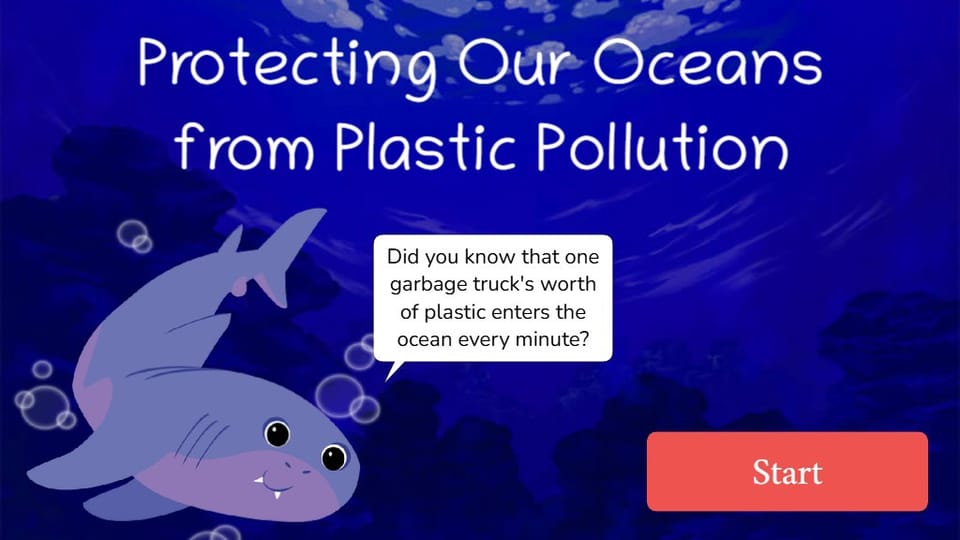
Explore the global issue of plastic pollution in the ocean and learn how to code an interactive, educational app. Students will research environmental facts, write with purpose, and code animations and interactive features to raise awareness about how plastic affects marine life—and what we can do to help. This lesson integrates literacy, science, and basic computer science principles.
Pacing
Grade
Grade 7
Coding
Beginner
Students codePlayer ActionsDragOn Page StartSequence
Opens a private practice project in the Studio — no account needed.
Teacher's Kit included — Lesson Plan · Student Kit · Answer Key · Rubric · See what's inside
Protecting Our Oceans 🌊

Lesson cover illustration

Standards-aligned
CSTAISTEAASL
Lesson at a glance
?
?Essential question
Students will be able to
  • Research the causes and effects of plastic pollution
  • Write structured explanations using evidence and examples
  • Code an interactive app with animations and a drag-and-drop clean up game.
  • Apply storytelling and user interaction to promote environmental solutions
The student journey

From reading to an interactive project

Elementari is a browser-based tool for creating illustrated, interactive stories and projects. Students plan their writing in the Student Kit, then add it to a digital project in the editor, called Studio.

1
✏️

Write & plan

Students use the Student Kit's storyboard to plan and draft their project. Choose High Support, Guided Support, or Independent to adjust the writing scaffolds.

1Student Kit · sneak peek
Planning questions for this lesson are included in the storyboard.
Glossary  a kid-friendly definition for every key term
2
🎨

Design & code

The main eventvaries by project

In the studio, students bring the project to life — adding art and following the exact writing and coding steps shown below. The Studio Compass walks them through it, one step at a time.

🧭Studio CompassStep 1 / 7
Research and Plan Your App 📝
Use the Protecting Our Oceans Organizer to collect your ideas. Explore at least three trusted sources (videos or articles), then use your research to complete each section of your
Each step checks off & advances on its own
All 7 studio steps · dynamic to the project
1Research and Plan Your App 📝
2Title Page – Introduction 🎬
3Problem Page – Impact of Plastic ❌
4Solution Page – How We Can Help ✅
5Interactive Cleanup – Take Action 🧩
6Animate Your Scene 🎭
7Final Details and Polish ✨
3
🔁

Polish

ongoing

Teacher and peer feedback pin right onto the project — students revise until it's ready to share.

Feedback on the project2 pins
🍎
Add one more sentence here so readers get the full picture.
👍 2Teacher
A
The interaction is clear — it helps the reader follow the project!
⭐ 3Peer
One-tap repliesNice work!Add detail
4
🚀

Publish

The payoff

Students finish and test their projects. Work submitted through a class goes to the teacher for review; publishing a project makes it public with a shareable link.

🎉When a project is published
A project made by your student
PublishedPublic project link
The Teacher's Kit

The printables that power the build

Open these resources as web pages, then use Print to print them or save a PDF. The Student Kit supports the writing; Studio provides the on-screen build steps.

Open print-ready resources
Start hereTeacher-facing

Lesson Plan

Your teaching plan: learning goals, lesson timing, discussion questions, assessment and coaching notes. Students follow the build steps in Studio.

Web page - print or save as PDF
Sign in to unlock
Before you teach

Set up in about ten minutes

A couple of things to gather, a few quick steps to prep — then you're ready to hand it to students.

What you need
  • A device per student or pair
  • Internet connection
Prep · about 10 min
  1. 1Print the student kits
  2. 2Assign this lesson to your students
  3. 3Skim the build steps
Standards alignment

Aligned to the standards you teach

Every task maps to a specific standard, so planning and reporting are covered.

Tracking 7 frameworks: Common Core ELA, Common Core Math, NGSS +4
21st-century skillsCritical ThinkingCommunicationCreativityCoding
CSTA3ISTE8AASL33 frameworks · 14 standards
CSTA
CSTA K–12 Computer Science Standards
3 standards
2-AP-10

Use flowcharts and/or pseudocode to address complex problems as algorithms.

Also addressed2-AP-13 · 2-AP-17
ISTE
ISTE Standards for Students
8 standards
ISTE 6b

Students create original works or responsibly repurpose or remix digital resources into new creations.

Also addressedISTE 6d · ISTE 6c · ISTE 5a · ISTE 4a · ISTE 4d · ISTE 4c · ISTE 4b
AASL
AASL National School Library Standards
3 standards
AASL I.A.2

Recalling prior and background knowledge as context for new meaning

Also addressedAASL I.B.3 · AASL I.C.4

Full task-by-task mapping — including Depth of Knowledge — is in the answer key.

Differentiation & accessibility

Choose the writing support

These are the three support options in the Student Kit. Choose the scaffolds students need while keeping the same project.

High Support

More writing scaffolds
  • Sentence frames break the response into manageable parts
  • Supplied words and ideas help students get started
  • Students still have space to write their responses

Guided Support

A starting point for writing
  • Task prompts and selected sentence starters
  • Writing cues and word banks where supplied
  • Space to develop each response

Independent

Less scaffolding
  • The same project and required writing tasks
  • Open response space without the support frames
  • Students develop their own wording
Accessibility, built inPredictable step-by-step structureOne task at a time · Studio CompassHighlighted response areasLow-stimulation printMovement-friendly pacingDesigned so every student can design, write, and code — with ADHD, autism, and dyslexia in mind.
Questions

Teacher FAQ

Do I — or my students — need to know how to code?

No prior coding knowledge is required to start. Students follow on-screen build steps in Studio. Coding difficulty describes the project's complexity; teachers may still need to help students test and revise. The lesson plan supports teaching, and the Answer Key provides sample writing responses.

How long does this lesson take?

About 180, paced into 45-minute class periods. You can spread it out or compress it — students pick up where they left off, so it doesn't have to finish in one sitting.

What devices does this lesson work on?

Use a Chromebook, laptop, desktop or tablet with a modern browser and an internet connection. The project editor does not support phones. Try the build on your class devices before teaching.

What is Studio Compass?

Studio Compass is the step-by-step guide inside the Studio. It shows students what to do next, identifies the exact coding blocks they need, and confirms completed milestones so they can keep moving independently.

How does this lesson support different learners?

The Student Kit has High Support, Guided Support and Independent writing profiles. They change the amount of scaffolding for the same project. Choose a profile in the kit before printing, and use the lesson plan's differentiation suggestions.

Ready when you are

Bring this lesson to your class

Import your class, assign in one click, and watch them build — the whole kit comes with it.

Free to try · No student emails required
Protecting Our Oceans 🌊
Grade 7 ·